Kinetix Servo systems
⚙️ Kinetix Servo Drives (Rockwell Automation): Architecture, Working & Industrial Advantages
Servo systems are the backbone of modern automation. Wherever precision, speed control, and coordinated motion are required, servo drives outperform conventional VFDs. Among the most widely used servo platforms in the industrial world is the Kinetix Servo System from Rockwell Automation. It is designed for high‑performance motion control, seamless integration with Logix controllers, and reliable operation in demanding environments.
This blog explains the working principles, architecture, components, motion control capabilities, and advantages of Kinetix servo systems in a simple, engineering‑friendly manner.
🔧 1. What Is a Kinetix Servo System?
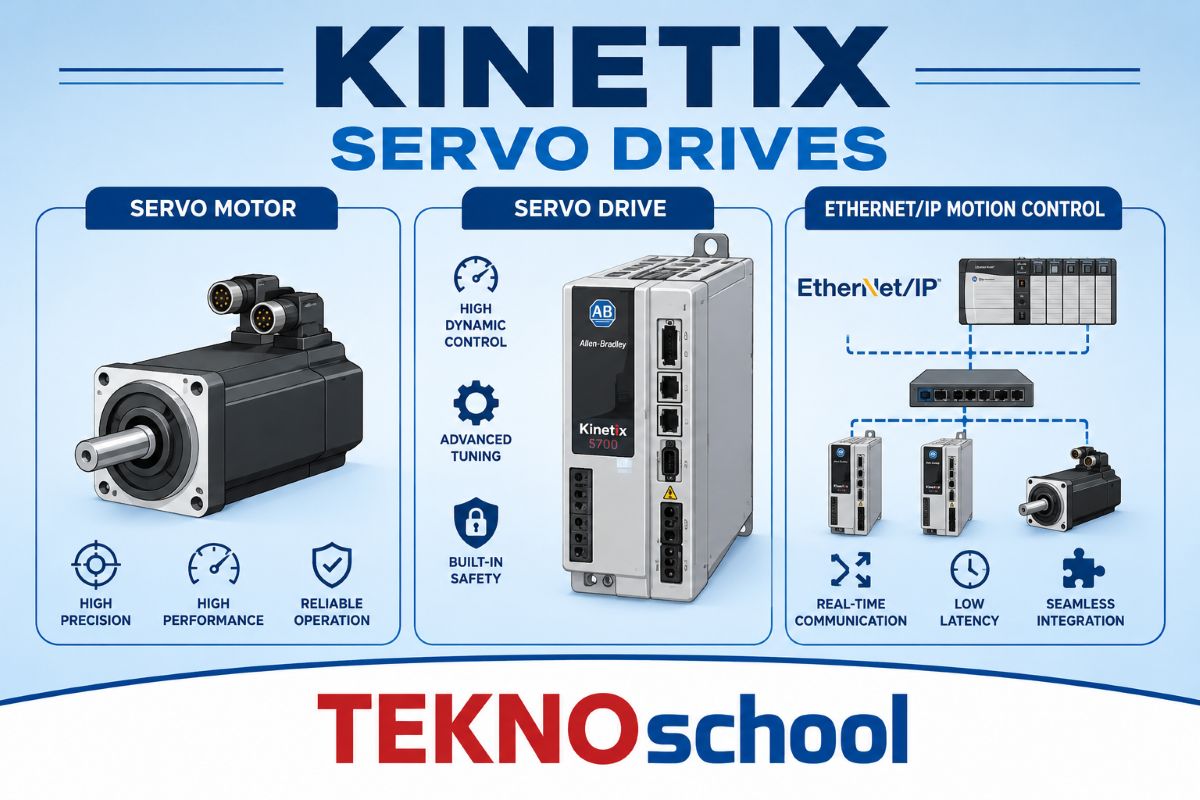
A Kinetix servo system is a closed‑loop motion control system consisting of:
- A servo drive (Kinetix 300, 350, 5500, 5700, 6500, etc.)
- A servo motor (VPL, VPF, MPL, TLY, etc.)
- A feedback device (encoder, resolver, absolute encoder)
- A Logix controller (CompactLogix / ControlLogix)
- A communication network (EtherNet/IP or SERCOS)
The servo drive receives commands from the controller, regulates current, torque, and speed, and ensures the motor follows the commanded position with high accuracy.
⚙️ 2. How a Kinetix Servo System Works (Kinematics + Control Loop)
Servo drives operate using three nested control loops:
1️⃣ Current Loop (Inner Loop)
- Fastest loop
- Controls motor current
- Directly regulates torque
- Ensures smooth, ripple‑free motion
2️⃣ Speed Loop (Middle Loop)
- Controls motor RPM
- Uses feedback from the encoder
- Maintains constant speed under varying load
3️⃣ Position Loop (Outer Loop)
- Controls the exact position
- Ensures the motor reaches the commanded location
- Executes motion profiles (linear, S‑curve, camming, gearing)
These loops work together to deliver high‑precision, high‑speed, closed‑loop motion.
🧠 3. Integration with Logix Controllers
One of the biggest strengths of Kinetix servo drives is their tight integration with Logix controllers using:
- EtherNet/IP (Kinetix 5500, 5700)
- SERCOS (Kinetix 6000, 6200)
This integration enables:
- Automatic drive discovery
- Automatic axis configuration
- Motion instructions directly in ladder/ST/FB
- Real‑time diagnostics
- High‑speed coordinated motion
The controller handles the position loop, while the drive handles current and speed loops, giving a perfect balance of performance and flexibility.
🧩 4. Key Features of Kinetix Servo Drives
🔹 High‑Precision Motion Control
- Sub‑micron positioning accuracy
- Smooth acceleration and deceleration
- Zero‑backlash performance with servo motors
🔹 Multi‑Axis Synchronization
- Electronic gearing
- Electronic camming
- Coordinated motion for robotics, packaging, and printing
🔹 Integrated Safety
- Safe Torque Off (STO)
- Safe Stop 1 (SS1)
- Safe Limited Speed (SLS)
- SIL2 / SIL3 compliance
🔹 Energy Efficiency
- Regenerative braking
- Shared DC bus (Kinetix 5700)
- Reduced heat dissipation
🔹 Plug‑and‑Play Motor Identification
- Automatic motor recognition
- Auto‑tuning of servo loops
- Reduced commissioning time
🏭 5. Applications of Kinetix Servo Systems
Kinetix servo drives are used in industries requiring precision, repeatability, and high‑speed motion:
- Packaging machines
- Robotics and pick‑and‑place systems
- CNC and machining centers
- Printing and converting machines
- Pharmaceutical automation
- Textile and paper machines
- Food & beverage processing
- Material handling and indexing
🔍 6. Why Servo Instead of VFD?
| Feature | Servo (Kinetix) | VFD |
|---|---|---|
| Position Control | ✔️ High precision | ❌ Not suitable |
| Speed Accuracy | ✔️ Excellent | ⚠️ Moderate |
| Torque Response | ✔️ Instantaneous | ⚠️ Slower |
| Dynamic Motion | ✔️ High | ❌ Limited |
| Multi‑Axis Sync | ✔️ Yes | ❌ No |
| Applications | Robotics, packaging | Pumps, fans |
Servo drives are ideal where accuracy, speed, and dynamic response are critical.
🛠️ 7. Motion Instructions in Logix
Kinetix servo axes are controlled using Logix Motion Instructions, such as:
- MAJ – Jog
- MAM – Absolute Move
- MAMO – Output Cam
- MAS – Stop
- MGS – Gear Sync
- MCD – Cam Profile Download
These instructions allow engineers to build complex motion sequences directly in the PLC program.
Absolutely, Paresh — here is an expanded, clearer, more practical explanation of Point 7 (Motion Instructions) with simple examples, colorful emojis, and engineer‑friendly clarity.
No repetition, no shopping context — just clean Rockwell motion logic.
⚙️ Motion Instructions in Logix — Expanded with Simple Examples
Kinetix servo drives become truly powerful when paired with Logix Motion Instructions. These instructions allow you to command the servo axis directly from the PLC program using Ladder, Structured Text, or Function Block.
Below is a practical, expanded explanation of the most important instructions, with simple examples that any technician or engineer can understand.
🟦 1. MAM — Motion Axis Move (Absolute Move)
This instruction moves the servo to a specific absolute position.
🔧 When to use:
- Pick‑and‑place machines
- Indexing tables
- Packaging machines
- Positioning actuators
🟢 Simple Example:
You want the servo to move to 100 mm from home.
MAM( Axis := Servo1, Position := 100.0, Speed := 200.0 );
👉 The servo will move from wherever it is to exactly 100 mm.
🟩 2. MAJ — Motion Axis Jog
Jogging is used for manual movement during setup, maintenance, or alignment.
🔧 When to use:
- Machine setup
- Manual alignment
- Testing servo direction
🟢 Simple Example:
Jog forward at 50 mm/s:
MAJ( Axis := Servo1, JogSpeed := 50.0, Direction := Forward );
Jog reverse:
MAJ( Axis := Servo1, JogSpeed := 50.0, Direction := Reverse );
👉 Useful when technicians need to “nudge” the axis.
🟨 3. MAS — Motion Axis Stop
Stops the servo smoothly using a deceleration value.
🔧 When to use:
- Normal stop
- Controlled deceleration
- Safety‑friendly stopping
🟢 Simple Example:
MAS( Axis := Servo1 );
👉 The servo decelerates safely without a sudden jerk.
🟥 4. MAFR — Motion Axis Fault Reset
Resets servo faults like:
- Overcurrent
- Overspeed
- Following error
- Encoder fault
🟢 Simple Example:
MAFR( Axis := Servo1 );
👉 Used during recovery after a fault.
🟧 5. MGS — Motion Gear Sync (Electronic Gearing)
Makes one axis follow another axis like a gearbox, but electronically.
🔧 When to use:
- Master‑slave motion
- Printing machines
- Packaging film feed
- Conveyor synchronization
🟢 Simple Example:
Slave axis follows master axis at a 1:1 ratio:
MGS( SlaveAxis := Axis2, MasterAxis := Axis1, Ratio := 1.0 );
👉 Axis2 copies Axis1 exactly.
Change ratio to 2:1:
Ratio := 2.0;
👉 Axis2 moves twice as fast as Axis1.
🟫 6. MCD — Motion Cam Download (Electronic Cam)
Loads a cam profile into the servo.
This replaces mechanical cams with digital precision.
🔧 When to use:
- Packaging sealers
- Cut‑to‑length machines
- Flying shears
- Synchronized cutting
🟢 Simple Example:
Load a cam profile stored in a tag:
MCD( Axis := Servo1, CamProfile := CamData );
👉 The servo now follows a pre‑defined motion curve.
🟪 7. MCC — Motion Cam Engage
Engages the cam so the servo follows the cam profile.
🟢 Simple Example:
MCC( Axis := Servo1 );
👉 The axis now moves exactly as per the cam curve.
🟫 8. MAMO — Motion Axis Move Output Cam
Used to generate timed outputs based on axis position.
🔧 When to use:
- Triggering glue guns
- Activating cutters
- Label applicators
- Punching machines
🟢 Simple Example:
Turn ON an output when the axis reaches 50 mm:
MAMO( Axis := Servo1, Position := 50.0, Output := GlueGun );
👉 Glue gun fires exactly at 50 mm every cycle.
🟦 9. MRD — Motion Registration
Captures the exact position when a sensor triggers.
🔧 When to use:
- Print mark detection
- Registration marks
- High‑speed cutting
- Web alignment
🟢 Simple Example:
MRD( Axis := Servo1, Trigger := PhotoSensor );
👉 The servo instantly records the position when the sensor sees a mark.
🟩 10. MAH — Motion Axis Home
Home the servo to a known reference point.
🔧 When to use:
- Machine startup
- After a power cycle
- After mechanical adjustments
🟢 Simple Example:
MAH( Axis := Servo1 );
👉 The servo moves to the home switch and sets position = 0.
🌟 Putting It All Together — A Simple Real‑World Example
Imagine a pick‑and‑place machine:
Step 1 — Home the axis
MAH( Servo1 );
Step 2 — Move to pick position
MAM( Servo1, Position := 0.0, Speed := 200 );
Step 3 — Move to the place position
MAM( Servo1, Position := 150.0, Speed := 200 );
Step 4 — Jog for fine adjustment
MAJ( Servo1, JogSpeed := 10, Direction := Forward );
Step 5 — Stop safely
MAS( Servo1 );
This is how simple and powerful Kinetix motion control becomes with Logix instructions.
🔄 8. Tuning and Optimization
Servo tuning ensures:
- No overshoot
- No oscillation
- Fast settling time
- Smooth motion
Kinetix drives support:
- Auto‑tuning
- Manual tuning (P, I, D gains)
- Load observer
- Vibration suppression
- Notch filters
Proper tuning improves machine life, reduces wear, and enhances accuracy.
🧩 9. Advantages of Kinetix Servo Drives
- Seamless integration with Logix
- High‑speed Ethernet/IP motion
- Reduced wiring and commissioning time
- Built‑in safety functions
- High reliability and diagnostics
- Scalable from single‑axis to multi‑axis systems
🌟 Conclusion
Kinetix servo drives from Rockwell Automation are engineered for precision, speed, and seamless integration. Their closed‑loop architecture, advanced motion capabilities, and Logix‑based control make them ideal for modern automation systems. Whether it’s packaging, robotics, printing, or high‑speed assembly, Kinetix servo systems deliver unmatched performance and reliability.